Aardy Manager (Mac)
Fixing dates, places and landmarks
The Metadata tab, bulk edits, and how Aardy finds places, online or offline.
Captions are only as good as the information behind them. The Metadata tab in the pack builder shows one row per photo with its date, place, landmark and label, so you can fix what is wrong.
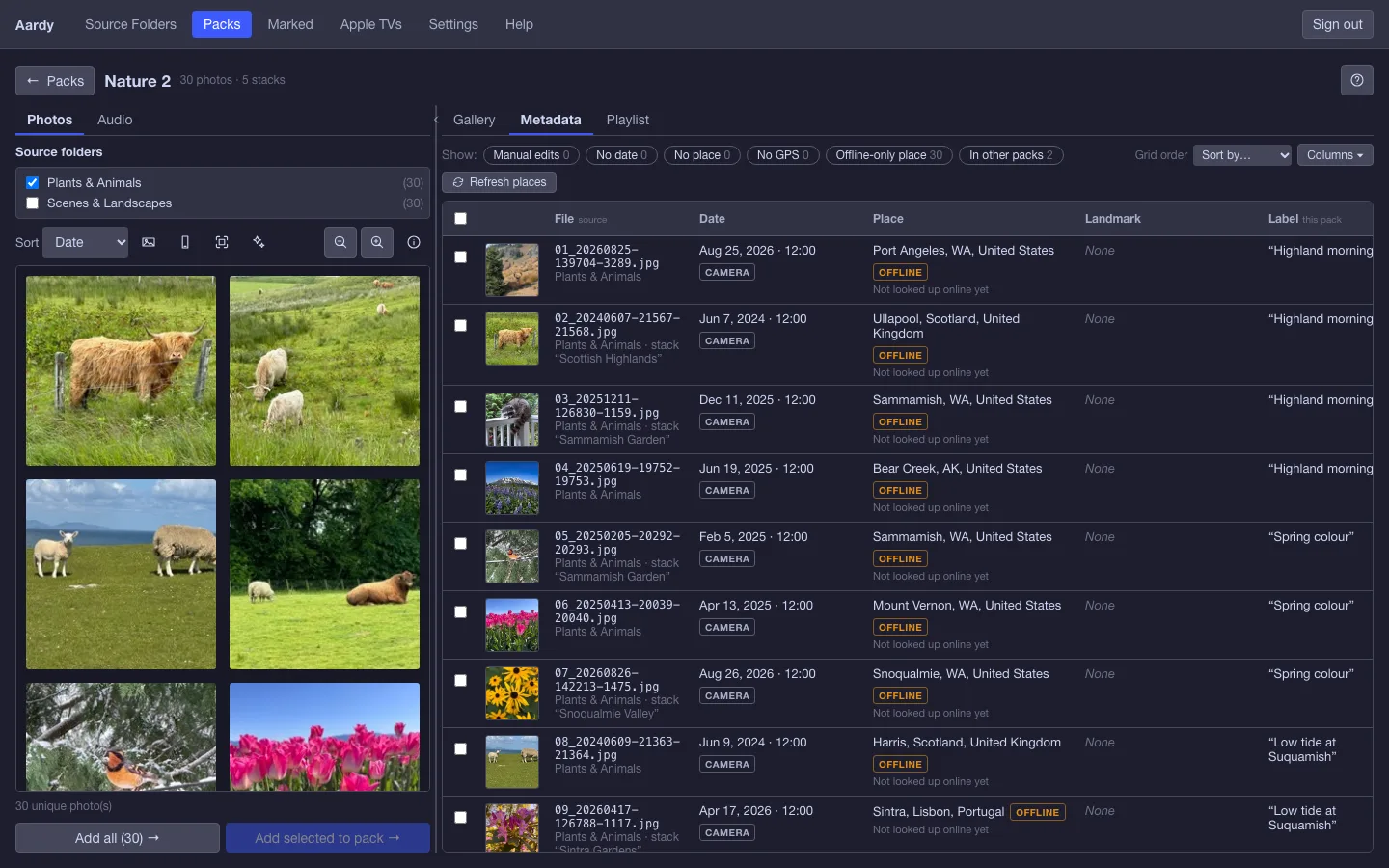
Where each value came from
Every value carries a tag that says where it came from:
- Camera: read from the photo file.
- Offline: from Aardy's built-in map, which works with no network.
- Online: from the online lookup service.
- Manual: typed by you.
A value you type always wins over the camera and the lookup service. A manual value shows the one it replaced underneath, with Revert to go back to it. A typed place turns the looked-up landmark off unless you type a landmark too.
Edit one photo or many
- Double-click a cell to edit it inline.
- Select rows to show the bulk bar, then choose Bulk edit to change many at once. Blank bulk fields leave each photo's own value alone. Every change can be undone from the message that follows it.
- Date, place and landmark belong to the photo, so an edit shows in Source Folders and in every pack that uses it. The editor names those packs before you apply.
- The label is this pack's caption. Tick Also set in other packs to write it everywhere the photo appears.
Click a column heading to sort, again to reverse, and a third time to clear. Shift-click adds a second sort. Sorting only changes the view unless you choose Use this order in the pack. Hover over a thumbnail to see it larger.
Places and landmarks
Aardy places photos from their GPS when they are imported, using an offline map. It works with no network but only knows sizeable towns, so it answers with the nearest one it has. A photo taken at a remote cape might be captioned with a town fifty miles away.
Refresh places asks the internet for the real answer and picks up landmark names at the same time. Select photos first to fix just those. With nothing selected it does the whole pack.
Note: Refresh is slow on purpose. The map services it uses are free and shared, so Aardy works through roughly one location every two seconds and shows its progress. It also runs quietly in the background each time the app starts.
Fix info opens the Metadata tab for cases where even that is wrong.
Landmark language and your home country
Each TV can show landmark names in a language you choose, in its settings on the Apple TVs page. In Settings, the home country tells the caption which country name to leave off, so you see "Seattle, WA" rather than "Seattle, WA / United States".