Aardy for Mac
Your memories, presented your way
Don’t let your memories rot on a hard drive. Aardy for Mac gives you complete control over how your photos come back to life: what plays, how it looks, what it tells you, and on which TV.
It’s free, it runs quietly in your menu bar, and it gives you Aardy Manager, a control page you can open in any browser on your home network.
Shown with sample photos.
Gather
Find your photos wherever they live
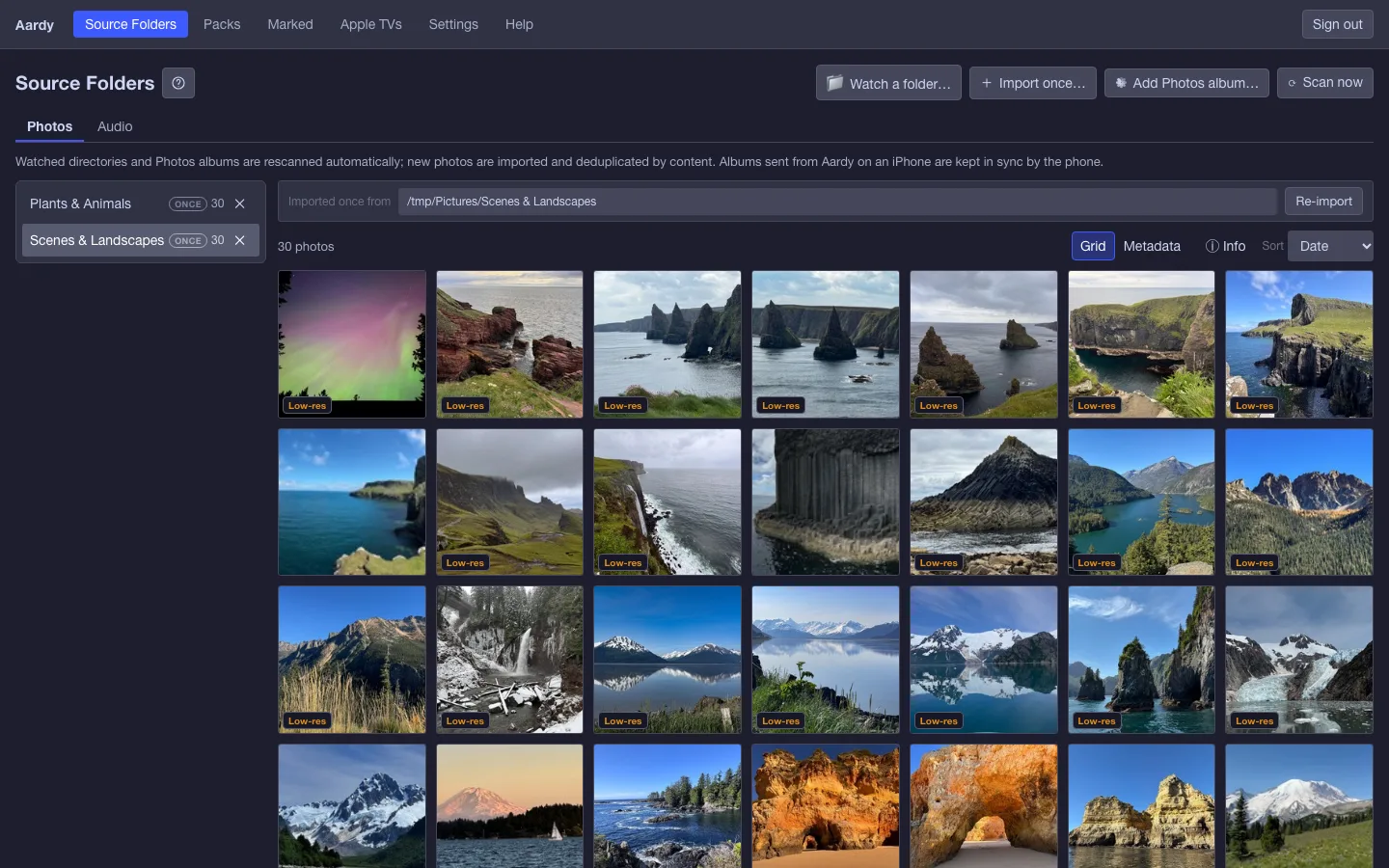
Point Aardy Manager at the places your memories already are. Nothing has to be moved or reorganized first.
- Folders on the Mac, and external drives.
- Network shares and your NAS, once the Mac has them mounted.
- Shared Albums from the Photos app, including the iCloud Shared Album your family adds to. Your own albums and smart albums like Favorites work too.
For each folder, choose Watch and Aardy rescans it on its own, so new photos show up without lifting a finger. Or choose Import once to copy a folder in one time.
Keep the visit. When the grandkids head home, the album their phones sent doesn't have to go with them. Choose Keep on this Mac and it becomes an ordinary folder, every photo still there and every pack still playing them, ready for the next visit.
Build
Build packs from your own photos
A pack is a curated set of your photos with its own order, captions, look and sound. The Pack Builder is where you make one.
- Order and stacks. Play by date, by place or your own order, and group moments into stacks with their own pace.
- Captions and details. Write labels, and fix dates, places and landmarks so the TV says the right thing.
- The look. Sixteen transitions, overlays you position, portrait handling and sound.
- See it on the TV. Each feature is shown beside what it does on your Apple TV.
Ideas
Packs for every season and every reason
Build it once. Put it on a TV. Swap it for another whenever you like.
Holidays
Christmas, Hanukkah, Thanksgiving, the Fourth of July. Build the pack once, put it on the TV in December, swap it out in January.
Summer trips
The beach week, the road trip, the camping weekend. Order it by place and the trip plays in the order you traveled.
The grandkids
A pack that grows as the kids do. Add new photos each season and the whole family sees them on the big screen.
A pet
Years of the dog, the cat, the chaos. Group the best bursts into stacks so they get a little more screen time.
An anniversary or wedding
Put the wedding day, the first apartment and every year since into one pack, and play it on the day.
A team’s season
Game days, the trophy, the team photo. Caption it with the score or the year.
A memorial
Keep someone close. A quiet pack of their photos, shown whenever the family gathers.
Seasonal décor
Autumn leaves, winter snow, spring flowers. Let the room change with the calendar.
A party
Graduation, a milestone birthday, a reunion. Put it on the TV for the evening and swap it back after.
Automatic
Aardy comes on by itself
With Aardy for Mac, your Apple TV doesn’t need you to press anything. When the TV has been sitting idle (10 minutes by default), the Mac starts Aardy for you. It’s like a screensaver for your Apple TV.
It’s a separate thing from the screensaver built into tvOS, which Aardy doesn’t replace. Aardy starts its own app on the TV instead. This automatic start is a feature of Aardy for Mac, and it is not available when you only use an iPhone.
Never interrupt what you’re doing
Tell Aardy which apps on each TV must never be interrupted. While one of those apps is open, such as FaceTime, Aardy stays off. Pick them from the list of apps installed on that TV.
Every TV
Give each TV its own packs
Pair each Apple TV from the Aardy menu-bar icon. Then, on the Apple TVs page, add one or more packs to it and put them in order. Play them one after another, or mixed together. Every TV in the house can have the same pack or its own.
You can override a pack’s look for a single TV, such as its transition, timing, captions and overlay position, landmark language, Live Photo sound and music.
And change it from the couch
The Aardy app on the TV has its own Settings, opened by pressing and holding the Siri Remote’s clickpad. From there you can switch packs on or off, change their order, filter a pack by year, place or tag, override how photos look on that TV, and set its sound. See Aardy for Apple TV.
And more
A few more things the Mac takes care of
Sharper on a 4K TV
Photos too small for a 4K screen are upscaled on your Mac in the background, and the sharper copy goes to 4K TVs. Your originals are never changed. You can turn it off for a pack.
Weather
Add your cities and pick °F or °C. The weather screen on the TV is one swipe away. Data comes from MET Norway, with no signup.
Your music
Add a music folder and build playlists for your packs. The files are played where they are, never copied.
Backups
Aardy saves a backup before every update, and you can back up now or download an encrypted copy to a drive.
Every TV, every user
Run as many Apple TVs as you like. If several people use the Mac, you can share Aardy so whoever logs in keeps it running.
Private
There’s no cloud and no account. Your photos stay on your network.
Free
Download Aardy for Mac
A direct download, signed and notarized by Apple, because a Mac App Store app can’t watch drives and network shares the way Aardy does.
What you need
- A Mac that stays on. It serves your photos to the TVs.
- An Apple TV with tvOS 17 or later, on the same network as the Mac.
- Your photos in folders, on an external drive, or on a NAS the Mac has mounted.
The supported macOS versions are listed here when the download opens.
What’s included
- The menu-bar app and photo server
- Aardy Manager, in your browser
- Packs, captions, audio and weather
- 4K upscaling, backups and automatic start when the TV is idle
Setup in three steps
- Open Aardy and set an Aardy Manager password.
- Add your photo folders and build a pack.
- Pair your Apple TV from the menu bar, open Aardy on the TV, and give it the pack.
Step-by-step guides are in the setup docs. Windows is coming soon.